Open Existing Project
Use the Open Existing Project window to view, access, or open a specific version of previously created projects in your workspace.
What is "Open Existing Project"?
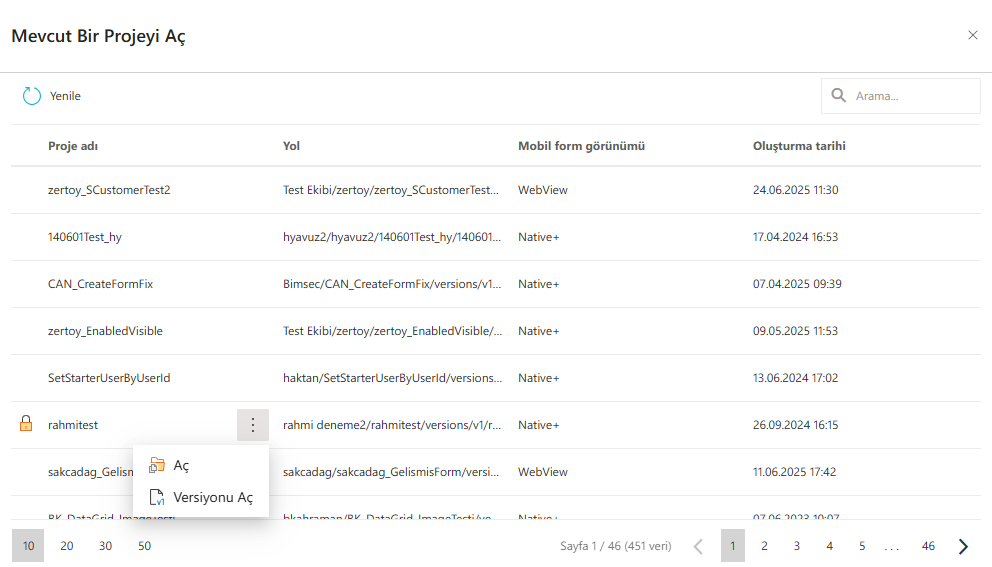
The Open Existing Project modal in Synergy IDE allows users to browse and reopen any previously created or imported projects. This interface provides a searchable and sortable table of all accessible projects.
It is ideal for quickly switching between projects or resuming work from where you left off.
Features of the Project List
The table displays the following details for each project:
Project Name– The name given during project creation.Path– The folder or directory where the project is stored.Mobile View Mode– Indicates the project's mobile interface compatibility (e.g.,WebView,Native+).Created Date– The date and time when the project was created.Context Menu (⋮)– Click the three-dot icon next to a project to access the following actions:Open: Opens the selected project for editing.Open Version: Allows selecting and opening a specific version of the project.
Pagination– Navigate through the list using the controls at the bottom.
Use Cases
- Quickly resume work on a current project.
- Access archived or backed-up projects for reference.
- Open an older version of a project for comparison or rollback.
Best Practices
- Use meaningful project names for easy searching and identification.
- Protect sensitive projects with proper permissions in shared environments.
- Be cautious when opening previous versions to avoid overwriting newer changes.
See Also
FAQs
- What does Mobile View Mode mean in the project list?
- What actions are available in the Open Existing Project panel?
- Can I open a password-protected project?