Versions
Lists available versions of a project and allows opening a specific one.
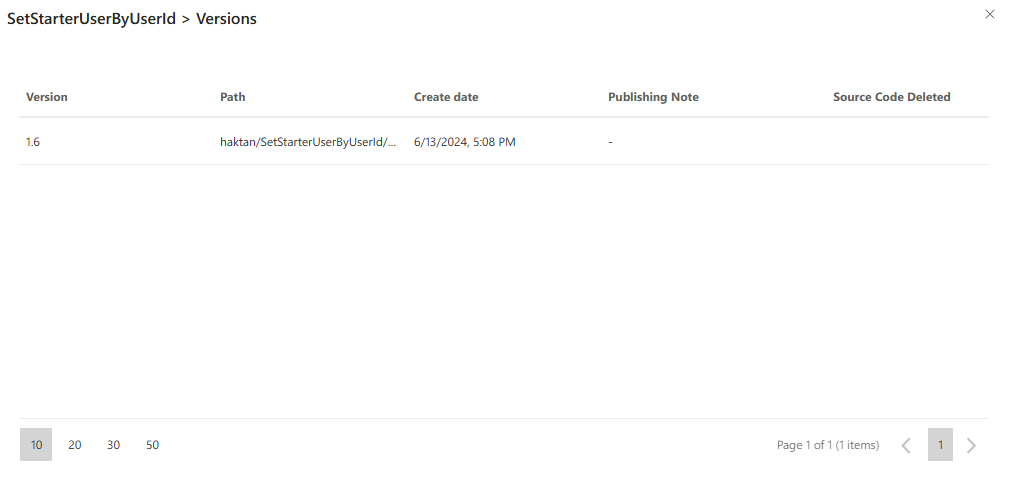
When you select Open Version from the context menu of a project in the Open Existing Project screen, a new panel opens showing all saved versions of the selected project.
Each version row includes:
Version: The semantic version label of the saved project (e.g., 1.13).Path: The directory where the version is stored.Created Date: Timestamp indicating when the version was created.Release Note: Optional note entered when the version was published.Source Code Deleted: Checkbox showing whether the source code of that version is removed. If checked, the version cannot be opened or edited.
Opening a Version
- Click the
⋮icon at the end of the version row. - Select
Aç (Open)from the dropdown menu. - The selected version will be loaded into the IDE if the source code is available.
If the Source Code Deleted box is checked, the version is read-only or cannot be opened.
Tips
- Use this feature to roll back to a previous state or inspect changes.
- You can open multiple versions from different projects for comparison.
FAQs
- Can I open a version if the source code has been deleted?
- What is the purpose of the Release Note in a version?