View
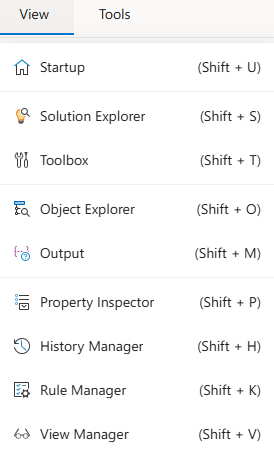
The View menu allows you to open or manage different utility panels for the active project.
Functions:
Startup: Redirects to the IDE start screen.
Solution Explorer: Displays project content (forms, flows, scripts, etc.) in a tree structure.
Toolbox: Opens the component insertion panel for building forms or flows.
Object Explorer: Lists the objects used in the active form or flow.
Output: Displays build logs, compiler output, and system messages.
Property Inspector: Shows editable properties for the selected item.
History Manager: Displays version history and change logs.
Rule Manager: Provides centralized access to business and validation rules.
View Manager: Manages visual layouts and saved views within the project.
All view panels are accessible when a project is open.
If a panel is closed, it can be reopened via this menu.